This project is my attemp to write an open-source software for the well known EPi-OSD which is based on the popular MAX7456 by MAXIM.
The name somehow derives either from the language it is written in, my nickname or my real name, the choice is up to you.
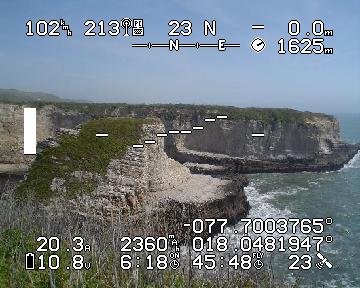
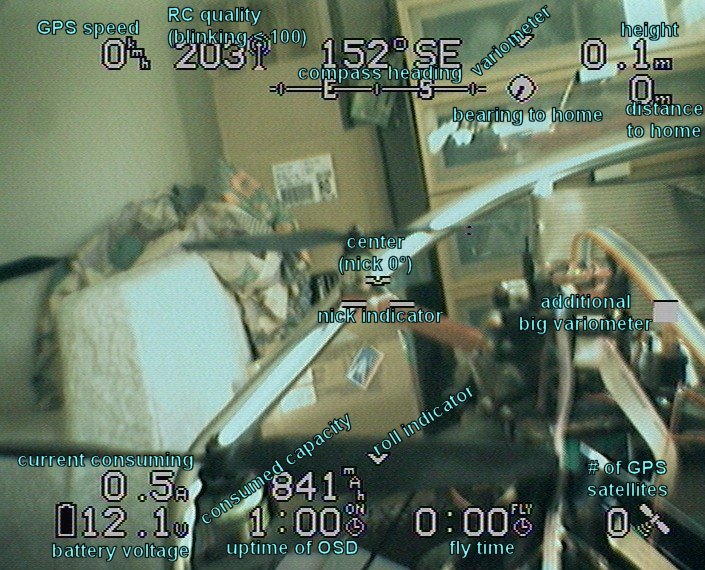
So maybe you want to know what this is all about, let's take a look at a screenshot:
Back in 2008 I made a little helper-script called max7456 chars made easy (german page) to generate characters for such OSDs. The script is still working and helped me a lot making characters that suited my needs. You can still use it for making own chars, it is also mentioned in the source-code.
The original software was closed source and it held the project somehow to a lower level than it could have been till now. There were other projects using the chip as well but somehow nobody from the MikroKopter-Community, which is the community around the remote controlled quadrocopter the OSD was developed for, made the effort to start an open-source version that will run on the great hardware.
At 23rd of March 2009 I came home earlier than I thought from a night out and wanted to do something productive, this is it.
What can it do?
Since most likely users use the C-OSD software along with a NaviCtrl I will list features that are available to such environments.
Display current speed over ground
In the default configuration the speed over ground is shown in the top left corner. You can choose between kmh and mph within the config menu.
Display current RC-link-quality (RSSI)
In the default configuration this is shown next to the speed. When using a normal RC-Receiver with a sum-signal this is a pseudo value computed by the FC measuring some latencies within the PPM signal. When using an ACT-DSL Receiver connected with the DSL-Cable this is an actual RSSI value given out by the ACT-Receiver. The numbers will start to blink when value goes below 100.
Display current compass heading
In the default configuration the heading is shown centered in the top line. This the value in degrees the copter's nose is heading at. Below the value there is a line with the next compass directions shown to see in which direction to gier for a desired direction. Next to the number value there is a textual representation of the direction you are facing.
Display current variometer
Next to the compass value there is an indicator showing whether you are climbing or falling in the air. It is indicated by little triangles. The more triangles, the faster you are going up/down. In the menu you can enable a bigger vario bar that will be shown at the right side of the screen.
Display current height
In the top right corner the current height will be shown. Again the value can be changed from meters to feet. Below 10 there will be a digit after decimal point, over 10 it will be shown without decimal point.
Display current bearing to home
Just below the variometer there will be a circle with a little line in it facing to the home-position. Very helpfull wenn flying in booring environment that really looks the same everywhere. Just turn the MK so the line shows to the top and you are heading home.
Display current distance to home
Next to the bearing to home there is the distance in meters (or as you would have guessed, in feet) shown you are away from your home position. Moreover usefull for range testing :)
Display artificial horizon
In the center of the screen you can enable an artifical horizon (you can choose between two different styles in the config menu). It will visualize the roll and nick angles so you can get a clue of the absolute position of your MK towards the horizon. Very usefull when flying with nick and roll balanced cameras.
Display current power consumption
The 2nd line from the bottom starts with a current power consumption. This can either be measured by the BlCtrls (needs versions >=1.1 of those controllers) or by the EPi-Strom device. You can toggle the device to use in the menu and turn the values of if they disturb you.
Display how much power got wasted
Next to the current power consumtpion there is a summed up amount of power you have currently wasted during your flight. After some flights you will see how much you can drain from you LiPos and notice that this is a nice way to keep enough power in the battery for landing.
Display current battery voltages
The last line starts with a battery voltage display. Two times. The first is a battery-icon that will get empty when flying till it blinks when a(n auto detected number of cells * critical cell) voltage is passed. A goot time to go down and search a nice place to land you MK is reached when blinking. This really depends on the type of LiPo you are using. Some have a real hard discharge-curve and when the blinking starts you cannot land you MK safely with an mounted camery since the motors cannot lift the falling device anymore. So keep an eye on the voltage and remeber values you have successfully used for landing. When using an EPi-Strom along with C-Strom you can display a seccond voltage that is measured by C-Strom. Sometimes used to show how much power there is left in an extra video-transmitter-battery.
Display uptime
Next to the voltages in the last line there is an uptime counter showing you how long your OSD has been turned on. When having no current measuring/fly-time this can help you to keep in mind that the device won't fly forever.
Display flight time
The fly time is basically the time the motors have been on. This gets resetted to 0 whenever you turn the motors off.
Display number of satellites received by GPS
Ever wondered why position hold did not work? Keep an eye on the number of satellites your GPS receives. Very helpfull to debug disturbing environments. Might happen that things around your flight spot disturb your GPS-Receiver. Apart from high voltage lines this even can be your own RC-receiver.
Switch the OSD overlay ON/OFF with a (spare) RC-Channel
You can connect any PPM-Signal to the PPM-Port to toggle the display on/off during flights. Might be nice for recorded FPV-Flights where the OSD disturbes but sometimes is nice to keep the battery in mind.
Display data out of the EPi-Strom
You can connect the EPi-Strom (running C-Strom) to the ISP port and use the measured values in the display.
Fully Open Source
As the title suggest, this software is fully open source. You can modify it so it fits your needs. You can try to spot and correct bugs. And I would like it if you share your foundings with me.
What are the menu points for?
Since this gets asked often...
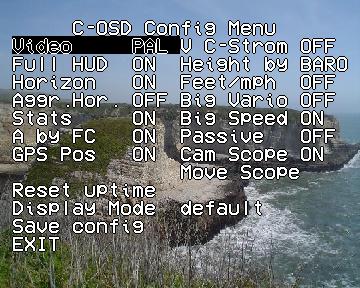
Video PAL|NTSC
This one is easy. Sets the display mode. This is the first point by purpose, so you can still swtich mode when the wrong one is selected by just guessing what you are doing.
Full HUD ON|OFF
Enables or disables the display of the whole HUD stuff. Can be toggled via the PPM connection as well. Short flight with a cam you do not want to be nagged by the OSD? No problem, switch it off here.
Horizon ON|OFF
Enables or disables the artificial horizon.
Aggr.Hor. ON|OFF
When artificial horizon is shown, this selectc AGRESSiVA-horizon or when OFF normal horizon. The normal one is shown in the big image at the top of this page, the AGRESSiVA-version is shown below the video in a smaller image.
Stats ON|OFF
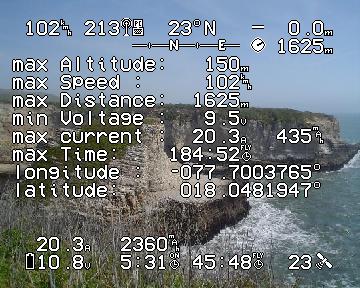
Display statisitcs after Motor off. Maybe you need to disable motors during flight and keep the whole stuff in sight, so just disable stats and enjoy the full sight while falling from the sky.
A by FC ON|OFF
Toggle display of the ampere measured by the BLCtrls. Requires usage of BLCtrl >= 1.1.
GPS Pos ON|OFF
Displays the current GPS-coordinates during flight. Might help to track missing people or you copter when the last recorded signal is up in the air.
V C-Strom ON|OFF
Toggles display of the Voltage measured by a additional EPi-Strom device running C-Strom. Like for extra video-tx battery or such.
Height by BARO|GPS
Select where the displayed height-value should come from, BARO or GPS. GPS still makes sense when a NC is connected that has a GPS connected.
Feet/mph ON|OFF
Distance and speed values in feet/mph? No problem, turn this one on.
Big Vario ON|OFF
En-/disable the big vario bar at the right side.
Big Speed ON|OFF
En-/disable a big speed-bar at the left side indicating how fast you are flying.
Passive ON|OFF
En-/disable passive-mode. In passive-mode the OSD will NOT request the datasets after it has _booted_. It will NOT update if the datasets are not beeing requested by any other hard- or software connected to the FC/NC. This might help when using other stuff along with the OSD and they can not handle other requests along with their own.
Cam Scope ON|OFF
Shows four brackets which can be moved around to define an area that is important or annotate the field of view from a second camera that is not attached to the OSD.
Move Scope
Move around the four brackets from the scope. Each bracket will be movabe in the x-dimension and afterwards in the y-dimension. Starting with top-left it goes over to top-right, bottom-left and bottom-right.
Reset uptime
Make an educated guess about this one.
Display mode default|minimal
Select the _theme_ to display.
Save config
Write current config to EEPROM so it can be loaded on next power on.
EXIT
Leave the boring menu and continue your FPV experience.
How can I use it?
Best chance is to buy yourself an EPi-OSD and solder it. Afterwards just take the precompiled .hex-files or compile the source on your own and flash it. Maybe a MikroKopter would be useful as well, or you adapt the sources to whatever you like, this is Spart^WOpenSource!
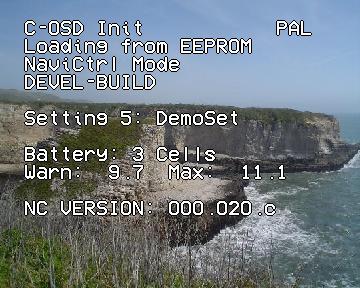
Start with the C-OSD-characters-pal.hex (or -ntsc.hex) file. Flash it and wait till the character screen appears and all the four LEDs are on, it indicates that the writing is finished. During the time it takes the Atmega162 to teach the MAX7456 the characters LED3 (one of the two green ones) will be blinking, indicating that there is still some stuff to do.
You should end up in a screen like the one to the right showing the complete character set that is on your MAX7456 now. You may have noticed that my characters (greetings to MarCopter who flooded me with more and more characters that I should use and am allowed to use) do not overwrite the original EPi-Chars, so you can easily switch back to EPi-Software without reflashing all the characters. Maybe some day there are more chars we need, but as long as it can be this way, why not doing it?Since there are so many cool characters people made it was time to go and overwrite some EPi-characters. Sorry.
Now you can flash the -pal.hex or -ntsc.hex according to your needs (you still can change the Video-Mode later, but the default mode is set within the different files) and start whining^Wbegging for support, most likely there will be some. But hey, the sources are open, help yourself!
Some command line hints:
Test the connection (reads out the Fuse-Bits):
Set the fuse-bits:
Flash a firmwarefile:
You might want to change COM1 or /dev/ttyS0 according to you operating system and your needs.
The simplest way (at least for me) is using a USBprog which is a cheap open source AVRISP mkII clone. It has more features than cloning this very one device, but I am using it for that very case. The whole flashing stuff is much faster than with a normal passive serial ISP-device (like SerCon) and it works directly out of AVRStudio. So you can hit compile and flash and have your current code in about 2-3sec on the chip, good for the try-and-error-coders like myself in some parts of especially this very piece of software. Be careful when using the SerCon on newer PCs/Laptops or when using a generic USB-to-Serial adapter. Newer mainboards sometimes do not have a real serial port, instead they have some sort of onboard-usb-to-serial-adapter. Both ways are known to cause problems when flashing AVRs using ISP. Get yourself a real USB-AVR-Programmer in such cases or you might get locked out of the AVR.
I made a little video-tutorial about flashing the software to the EPi-OSD board, this is outdated since now there is only one character file to flash, but it still might be helpful:
Discussions?
Since this somehow is for the MikroKopter I started a discussion thread about this in their forum: C-OSD - Die open-source Software fuers EPi-OSD
The Thread is mostly in german but you are invited to ask questions in english as well, so do not hesitate!
And please: Use that thread for any questions, a lot of other C-OSD user, which includes myself, have subscribed that thread and will instantly get a mail when someone posts there. So it is most likely to reach people that can help you out when posting to that very thread.
Some of the French buddys started a thread about this in their Forum as well, so if you are native French they might be able to help you. Check out EPI-OSD en OPEN SOURCE : C-OSD, but remember that I personally do not speak french at all and I am not constantly checking out the french forum.
Custom Characters?
Feel free to Design your custom chars, the .mcm file is in the SVN trunk and a recent version will be here: c-osd.mcm
which looks like the one to the right.
The characters used in this software are somehow community choice,... Somehow because I still was the one having the last word till now. Make some good ones and maybe they will get in the next release.
There are several ways to paint custom chars:
Take your favorite paint-program and modify the picture to the right, afterwards use max7456 chars made easy (german page) to create a .mcm file or the comfortable byte-arrays to put directly in the software
Downloads?
So you got interested? Really?
The latest version is:
To keep an eye on the latest version use the image above, it is auto-generated :)
You can use:
An Image representing the above string, useable in boards and stuff.
This is actually customizable like:
http://www.mylifesucks.de/oss/c-osd/C-OSD-latest-size65-tr100-tg100-tb255-br0-bg0-bb0-solid.png
Where size and solid should be self explaining and tr, tg, tb will set the text color and br, bg, bb will set the background color.
Acces the current sourcecode via SVN (you need to be registered over at the MikroKopter-Forum, your login-data will work for the svn as well:
svn co http://mikrokopter.de/mikrosvn/Projects/C-OSD
You can also browse the files of Projects/C-OSD/ online via webbrowser using WebSVN Projects/C-OSD/
If you are new to the SVN and AVR stuff, you might want to take a look at this short video I made:
The tools I am using are AVR Studio 4.16 (build 628) with WinAVR-20100110. Or on my laptop it is gcc version 4.3.2 (GCC) with Target: avr and some mixture of vi, NetBeans and gedit :)
I am not that picky regarding those stuff, as long as the tools are doing their job without a struggle I am happy. So pick whatever you prefer for yourself.
FAQ - Frequently Asked Questions
Where is the README?
Inside every release and source package and of course online: README.TXT
Why is the OSD only black and white?
Because the MAX7456 is not capable of generating colorful characters.
Are there any problems known when using the OSD along with Bluetooth/WI232?
When using the EPi-OSD, NaviCtrl and another Pc-Connection (direct or via wireless connections like bluetooth, WI232, WiFi and such) on the same wire there might be data collisions causing laggy screen updates, and in some hypothetical cases that are not scientifically proven, harm to the Atmega and other attached Hardware. So it is not recommended to use the stuff like that, altough some people are using it that way for months and not experiencing any problems at all. For developing the OSD I sometimes have even more devices attached to one wire, to sniff the data transfer between OSD/NC/PC/Whatever. But still, there might be fried chicken or cats...
When should I power on the OSD compared to NC/FC?
It works best when you just power up everything at the same time. Any later compared to the NC/FC should work also but before the NC/FC can cause trouble because the OSD keeps requesting data and the bootloader of the NC/FC might mistake that for any other fancy request.
What does menu-point XYZ do?
Give it a try... Or scroll this page up. There is a list with the options explained further to the top.
There is nothing been displayed after a successfull firmware flash. What am I doing wrong?
Hopefully nothing. There is nothing shown till valid data arrives, so if you have not connected a FC or NC you will not see anything except for the menu, it should work when pressing the buttons. You might think a welcome-screen or something else would be cool, but there are a lot of users who disable the OSD by unplugging the data link so the camera is still powered. Sadly I cannot please everyone...
Is there any known danger arising with this software?
Software may fry your cat when flashing the micro-oven with it, or even when using the software near a micro-oven. Where near means within 20.000km. If you can guarantee that the next micro-oven will be further away, it still might happen, could not test it till now. Any offerings for complete travels to a destination where such criteria is met will be gratefully accepted by me.
LED4 goes on 1sec while waiting for the NC/FC to come up
LED3 goes on when everything is initialized and the OSD is ready for data
LED1 indicates incoming data and will start blinking when receiving serial data
LED2 currently displays invalid cheksum for a received dataset or buffer overrun
A special case is character flashing. All LEDs will go off, LED3 will blink during flashing the characters and when finished ALL LEDs will go on.
C-OSD rocks, I am willing to donate some cents as a little thank you. May I?
If you are not expecting anything from it like additional support or integration of feature XYZ you can donate via PayPal:
Since the first donations reached me I would like to thank:
Robert D.
MarCopter
Martin W.
Jean-Christophe D.
Andreas G.
Bart V.L.
Ulrich W.
Kunihide Y.
Erwin B.
Globe Flight
Ralf S.
Stefan P.
jakob11
Michael R.
Judith L.
Daniel U.
André K.
Rolf G.
Stefan K.
Christian A.
Matthew D.
Last changes?
Best way would be to look at the CHANGE.LOG inside the SVN. It is more detailed and mostly more up to date.
15. Oct 2014: Small corrections and current version
06. Sep 2011: Added the compile HowTo-Video and a new source-snapshot
01. May 2010: Some bugfixes... But there are ft/mph displays in it by now
14. Feb 2010: Updated NC structs to 18c, added fc-current support, made cell guessing more stable
02. Nov 2009: Added NC/FC Version display and updated structs to FC 0.76e // NC 0.17e
06. Jun 2009: Added a Video-HowTo about flashing, minimal nc-mode layout can be chosen in menu
25. May 2009: Settings can now be saved, HUD can be toggled using RC-Channel.
19. May 2009: Some stuff regarding interfacing the EPI-S with my own firmware.
14. May 2009: A lot of changes including a version for FC-Only.
27. April 2009: Indication Icons for Manual Control and Serial Link.
17. April 2009: A lot of new characters added.
06. April 2009: Data struct changed to work with new NaviCtrl 0.15c release. Rewritten config menu.
02. April 2009: txd-pin gets disabled if not in use, data is re-requested if none has been coming in for 2s, more precise variometer (by shaddi)
31. March 2009: More statistics and little config menu controll, see README.TXT
30. March 2009: Moved over to the MikroKopter SVN
29. March 2009: More fixes in binary release. Statistics added. SOURCES released


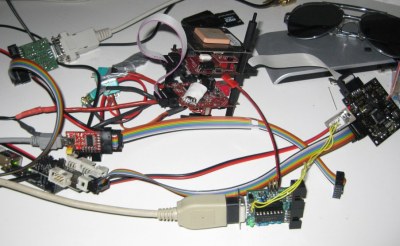 Back in 2008 I made a little helper-script called max7456 chars made easy (german page) to generate characters for such OSDs. The script is still working and helped me a lot making characters that suited my needs. You can still use it for making own chars, it is also mentioned in the source-code.
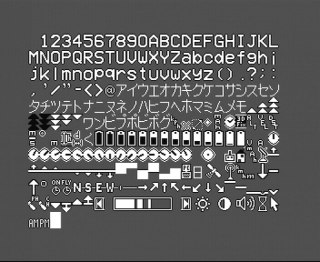 Start with the C-OSD-characters-pal.hex (or -ntsc.hex) file. Flash it and wait till the character screen appears and all the four LEDs are on, it indicates that the writing is finished. During the time it takes the Atmega162 to teach the MAX7456 the characters LED3 (one of the two green ones) will be blinking, indicating that there is still some stuff to do.
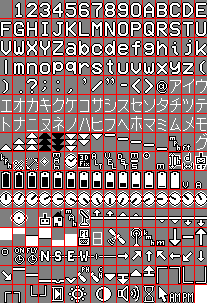 Feel free to Design your custom chars, the .mcm file is in the SVN trunk and a recent version will be here: